
Terrifi: a Terraform provider for UniFi networks (built with Claude Code and hardware-in-the-loop testing)
Introduction
My most recent hobby project has been Terrifi, a Terraform provider to manage my home UniFi network.
At the time of writing, the provider supports my entire home UniFi network, it’s live on the OpenTofu Registry, I just released version 0.2.0, and it might be ready enough for others to try. The provider also includes a CLI that makes it trivial to import existing resources to Terraform files.
This is my first end-to-end “vibe-coded” project, built mostly using Claude Code. I’ve used Terraform a lot over the years, and I’ve implemented some mildly-interesting modules, but I’ve never written a provider, and I’ve never used Golang in any serious capacity.
It’s also the first time I’ve built a hardware-in-the-loop test harness for a personal project. In short, every feature of Terrifi is validated end-to-end on real UniFi hardware. I think it was a particularly useful way to use Claude.
So this all seemed sufficiently fun and interesting to justify a post.
My Home Network
I started using UniFi for my home network about six months ago. This section is just a quick overview of my setup. I think this is pretty basic, so feel free to skip if you’re already familiar with UniFi hardware.
Hardware
At this point my network consists of the following:
- UniFi Gateway Lite - the primary router+firewall.
- Access Point U7 Lite - access point for most of the house.
- AC Pro - access point for the garage (bought used on eBay for ~$40).
- 10-port unmanaged POE switch - this is how I connect the access points and all other wired devices to the Gateway Lite.
- Raspberry Pi 4 (4GB RAM) running UniFi OS Server - this is the controlplane for the network.
As far as I know, this is a pretty standard UniFi setup. The only notable part is the UniFi OS Server.
Unlike most routers I’ve used in the past, the Gateway Lite doesn’t actually host its own controlplane (the thing that lets you see clients, configure the firewall, static IPs, WiFi passwords, etc). Some of the higher-end UniFi hardware has the controlplane built in, but for the cheaper stuff you either have to use their managed/online offering or host it yourself. I chose the latter, mostly because I just like to keep things local when possible.
Structure
This might deserve its own post, but the following aspects are worth mentioning.
I have 5 networks, and each of these is also a zone for firewall purposes:
- Default/Internal: this is everything connected via Ethernet, so a couple Proxmox hosts running some self-hosted services (Home Assistant, Scrypted, Joplin, Immich, and Cusdis), a TrueNAS server, and a Mac Mini.
- Personal Devices: this is for our personal laptops, smartphones, and tablets.
- Apple Home: this is for all our Apple home devices, so a couple Apple TVs, a HomePod, and a couple Airport Express used as Airplay adapters for speakers.
- IoT: for all our WiFi IoT devices, so a couple smart vacuums, smart plugs, cameras, home alarm, my Tesla vehicle, and my Tesla Powerwalls.
- Untrusted: the default network for anything connected to WiFi. If I trust the device, I promote it to one of the other networks.
I have 3 WiFi networks:
- A 5GHz network for anything that can use 5GHz.
- A 2.4GHz network for all the IoT devices that can only use 2.4GHz.
- A 5GHz guest network.
And I have some pretty basic firewall rules. By default no device can communicate across networks. And then there are exceptions, for example:
- Home Assistant and Scrypted can communicate to anything on the IoT network.
- Personal Devices can communicate to any of the Apple Home devices, mostly to allow Airplay.
- Some Personal Devices can communicate with anything on the Internal network, so I can administer all of this from my laptop.
- Several classes of IoT devices are blocked from communicating with the external world. For example, I block all my Tapo cameras from communicating with the Internet, except for NTP, which is needed to set the camera time (although I’d like to eventually self-host an NTP server for this). I’m also considering refactoring to a deny-by-default setup for IoT devices.
Terraform and UniFi
Where the Provider Fits
The UniFi OS Server talks to the UniFi Gateway and access points, essentially telling them how to behave.
The UniFi OS Server follows a pretty standard architecture. There’s a MongoDB database and a Java server. The Java server exposes some API endpoints (JSON over HTTP) and serves up a very nice client-side browser app. There’s also an official UniFi mobile app which talks directly to the server, presumably over the HTTP endpoints.
So a Terraform provider hits the API endpoints on the UniFi OS Server, essentially just like the web app or mobile app.
Why it Helps
Why do I need Terraform for my home network? Basically all the typical reasons for using infrastructure-as-code. Just calling out a few:
- With a sufficiently complicated network, editing text is way faster than using a UI.
- I can see and read all the configuration in one place.
- I can ask an LLM to make changes for me, and I still get to review it all before it takes effect.
Why not use an existing provider?
There are a few community providers that have been developed over the years. As far as I can tell, the main ones are:
- paultyng/terraform-provider-unifi
- filipowm/terraform-provider-unifi
- ubiquiti-community/terraform-provider-unifi
I gave these a try and ran into problems very quickly. Basic things like editing the name of a network crashed with a 400 response from the server. They also seem to be somewhere between abandoned or barely maintained.
Idealistically, I would be a good community member and open a bunch of PRs to the existing providers and upstream the fixes. But when I started this, it wasn’t even clear that anyone was even reading the issues, let alone the PRs. Claude and I did some research into upstreaming fixes for ubiquiti-community/terraform-provider-unifi, and concluded it would be cleaner to start fresh.
I’m certainly not opposed to upstreaming fixes in the long-run. And it’s all open-source, so anyone is entitled to take any and all parts of this. I suspect the most useful contribution of this provider is not the actual code, but rather the hardware-in-the-loop testing and development setup.
It’s also worth mentioning that maintaining anything related to the UniFi API seems very complicated. As far as I can tell, UniFi does not officially support or document their API. In the process of building Terrifi, Claude and I found a ton of quirks about the API. And that’s just on my own single version of UniFi with fairly basic hardware and architecture. I can’t imagine what it would be like to try to support the entire API surface. So I’m not at all surprised by the state of the Terraform providers.
What Terrifi brings to the table
- A handful of resources for managing a basic UniFi network, all documented on the Tofu Registry.
- A CLI for a few related tasks, like generating Terraform imports and resources from your existing network.
The number of resources is limited compared to some other providers. I’ve prioritized necessity and quality over breadth. If I didn’t need it, I didn’t add it. Every PR goes through automated testing on real UniFi hardware, covered more below. If I can’t test it with real hardware, I won’t add it. I’ll consider other resources, as long as they can be thoroughly tested.
The CLI is also somewhat novel.
Anytime I use a new Terraform provider, it’s a big pain to import and re-define all the existing infrastructure.
So Claude and I built the CLI to simplify this process.
You can just run terrifi generate-imports <resource name>, it calls your UniFi server to get the existing infrastructure, and prints out the corresponding import and resource blocks.
You’ll still need to do some editing and re-arranging, but it saves a ton of time.
Hardware-in-the-loop Testing
In this section I’ll stick to covering the why of hardware-in-the-loop (HIL) testing. The repository includes documentation and source code for the setup, and I intend to keep the repo up-to-date as it evolves, whereas the post is a point-in-time snapshot.
So why do we need HIL testing?
Claude and I very quickly found there was a long-tail of undocumented behaviors in the UniFi API. There were even issues just making and parsing responses with the community Go SDK. I had Claude summarize these quirks, see the appendix.
The existing providers test against a Docker container that’s running the UniFi API in simulation mode. That’s better than just unit testing, but it’s clearly not enough. The simulation mode supports very few of the resources. For example, to create a WiFi network, you need a real access point. To create a firewall zone, you need a real gateway.
So it quickly became clear that I needed to run these tests against real hardware.
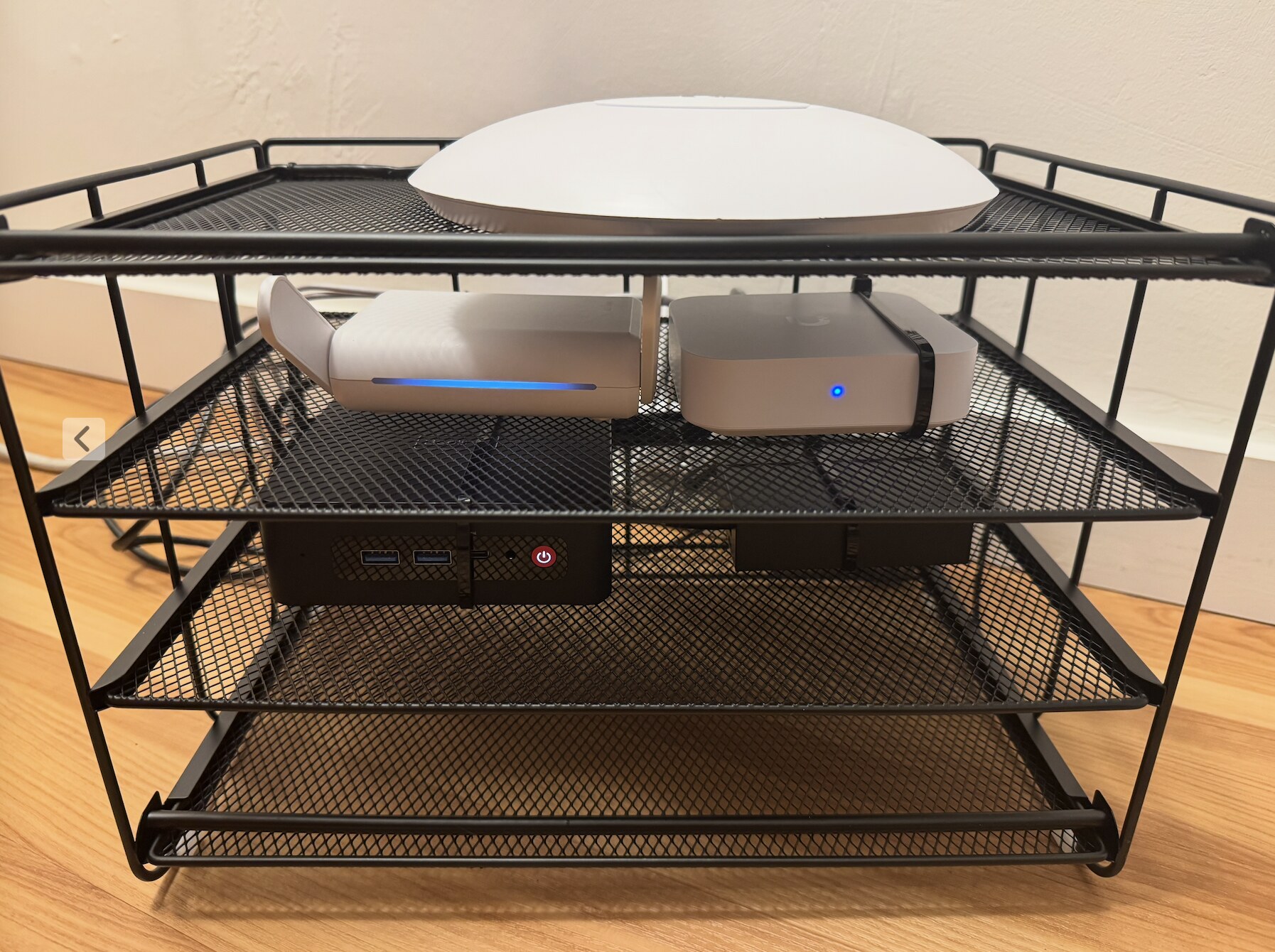
I didn’t want to break my actual home network for this purpose, so I went on Amazon and eBay and bought the cheapest real hardware I could find. The Gateway Lite was something like $55 on Amazon and the AC Pro was like $35 on eBay. I already had a travel router, switch, and mini PC available from other projects, and I already had a lot of experience with Proxmox, GitHub Actions, and Tailscale, all of which came in handy for the setup. I built it so that the HIL harness sits behind a router, so it can connect to the Internet but can’t connect to my actual UniFi network.
To get the setup working well took something like 20 hours of work. So nothing major, but I was also re-using a ton of prior knowledge.
I think it has paid off really nicely:
- Every GitHub PR runs a full suite of HIL tests against the real hardware.
- Claude makes extensive use of the UniFi OS Server when working on new resources and fixing existing bugs. It will sit there and run ad-hoc curl commands against the UniFi API to figure out how exactly it works, which parts of the community SDK it can use, and which parts need workarounds. This is another benefit of the isolated HIL testing environment; I don’t want it doing this reverse-engineering against my real network.
- Sometimes these tests flake, so I ask Claude to look at the recent flakes and figure out how to fix them. For example, this PR. I told it something like “run the HIL tests and fix any failures until the test suite has passed five times consecutively”. More recently I started running the HIL testing workflow on an hourly schedule in GitHub Actions. I plan to ask Claude to go find the tests that have flaked and work on a PR to fix them.
And here’s how it looks:
Vibe-coding the provider
Terrifi was largely “vibe-coded”, primarily using Claude Code (Opus 4.6).
My human contribution to this project was building the testing harness, determining the resource APIs, and prompting Claude to implement them. My direct interaction with source code was minimal. In code review, I primarily reviewed the docs and tests; I didn’t pay much attention to the actual implementation.
To get this working on my own home UniFi network, Claude and I ended up merging just over 80 pull requests over the course of ~3 weeks, about 75% on weekends. So it still required some focus and attention, but without a doubt much faster than had I coded this all “by hand”.
I think a few aspects of this project made it particularly amenable to vibe-coding.
The HIL testing harness provides an extremely tight feedback loop. I can prompt Claude to go implement a Terraform resource or attribute and let it iterate on real hardware to figure out how it should work. Once it writes the tests, they’ll automatically run for all future PRs.
Performance is mostly inconsequential. There isn’t going to be some subtle performance regression that gets through CI and a staging environment but crashes production. The “production” is running a single executable to figure out which resources to create/update/delete. Funny enough, there actually was a case where Terraform’s request parallelism and the inefficiency of some response types would make the UniFi OS Server fall over (Tofu apply keeps crashing my UniFi server). But crashing the UniFi OS Server doesn’t actually affect the network’s functionality, and it was pretty easy to fix by tuning a CLI parameter and introducing a short-lived cache.
Finally, I’m not particularly knowledgeable or opinionated about Golang. So I wasn’t picky about how the code looked. Early on, I did ask it to add comments to improve my own understanding of how a provider works.
All that said, it’s by no means perfect. There were still several cases where Claude’s first-pass implementation passed tests and then had to be revised:
- Unclear how to use port_group_id with match_opposite_ports: I wanted to block all traffic except to a particular group of ports. The bug was in the interaction of a couple fields in the API. Claude quickly figured this out with a few test requests to the UniFi API and opened a PR to fix it.
- Tofu apply keeps crashing my UniFi server: the Terraform provider was firing off many requests in parallel which led to out-of-memory errors on my little Raspberry Pi-hosted UniFi OS Server. Claude solved this by proposing the use of
-parallelism=1and caching some responses. - Unexpected new value was X but now Y: there was a field on the
terrifi_firewall_policyresource that indicated it would be used for ordering the policy, and the API accepted it on POST/PUT requests, but then it didn’t actually persist the value and returned a different one. Claude figured out a different way to order policies, using a new standalone resourceterrifi_firewall_policy_order. - 400 when creating policy with mac_addresses in destination: I don’t remember all the details, but some interaction of fields led to a 400.
- 400 when creating terrifi_firewall_policy with device_ids in source: I don’t remember all the details, but some interaction of fields led to a 400.
So overall Claude massively accelerated the implementation, but it still required some amount of judgement, guidance, and feedback.
Conclusion
If you like UniFi and you like Terraform, give Terrifi a try. Some good places to start:
- The OpenTofu Registry
- The examples directory, including a partly-redacted copy of my own network setup.
Appendix
Discussion
Quirks in the UniFi API and go-unifi SDK
I prompted Claude Opus 4.6:
summarize the quirky behaviors in the unifi API that we’ve had to work around in building this provider
Here’s what it told me:
- v2 API requires
_idin both URL path AND request body (PUT). Affects firewall zones and firewall policies. The SDK only puts the ID in the URL, but the v2 API returns500: "The given id must not be null"if it’s absent from the JSON body too. - DELETE returns 204, not 200. The v2 firewall zone and policy DELETE endpoints return
204 No Contenton success. The SDK only treats200as success, so it misinterprets successful deletes as errors. default_zone: falseserialization breaks zone creation. The SDK’sFirewallZonestruct serializes"default_zone": false(noomitempty), which the UniFi v2 API rejects with400 Bad Request. We had to write a custom minimal request struct without that field.- v1 vs v2 endpoint inconsistency for firewall zones. The SDK’s
GetFirewallZonehits the v1 REST endpoint, which doesn’t reliably returnnetwork_ids. Since create/update use v2 (which does return it), Terraform would see emptynetwork_idsafter every refresh, producing phantom diffs. portfield is a string in the JSON, not an integer. The SDK definesFirewallPolicySource/Destination.portas*int64, but the v2 API returns it as a JSON string (e.g."443"). This causesjson.Unmarshalto fail, breaking all GET/list operations for firewall policies.- Boolean fields serialized without
omitempty. Affects both firewall policies (enabled,logging,match_ip_sec, etc.) and client devices (use_fixedip,local_dns_record_enabled,fixed_ap_enabled). Withoutomitempty, they always serialize asfalse, silently clearing controller settings managed outside Terraform. setting_preferencedefaults to"auto", overriding user settings. The SDK’smarshalCorporate()for networks callsvalueOrDefault(n.SettingPreference, "auto"). Sending"auto"tells the controller to auto-manage settings like DHCP enable, which stomps on explicitly configured values. We force"manual"before every API call.- DHCP range fields crash the controller when empty strings are sent. Also in
marshalCorporate(): it usesvalueOrDefault(n.DHCPDStart, defaultStart)which fills in a default even fornilfields. Terraform’s “unknown” computed fields resolve to"", and passing&""causes the controller to throwjava.lang.IllegalArgumentException: Could not parse []. We guard withIsUnknown()checks to skip those fields entirely. - SDK doesn’t expose its HTTP client or CSRF token. Because the SDK creates its own internal HTTP client with no
Do()escape hatch, we can’t reuse its session for the v2 API calls that bypass it. We do a full independent login to get our own session cookie + CSRF token — effectively dual-login on every provider initialization.
Device Types Browser
As part of this project, Claude and I also built a Device Types Browser — a single-page app to fuzzy-search the ~5600 device types available in UniFi.
This came up when working on the terrifi_client_device.device_type_id attribute, which lets you set the device type icon and metadata so devices show up with nice icons in the UI.
The built-in UniFi device type browser is pretty limited: fuzzy search doesn’t work well and it’s hard to find the right ID.
So I had Claude add a CLI command that pulls the device type index from the UniFi API and generates the app.
Thoughts on AI, the Future of software, yada yada
I doubt I have anything novel to add to the AI discussion. But it’s my blog, so I’ll opine briefly.
My personal AI/LLM experience has gone something like this:
- Late 2022 - mid 2024: This is pretty cool, but spits out a lot of junk. I’ll occasionally ask it some questions or have it wordsmith a document.
- Mid 2024 - mid 2025: This can be quite useful, but you really have to ask the right question and present the right context. The web search integration is a huge unlock for doing research. But it still doesn’t make a big difference in my software work.
- Late 2025 - now: Holy shit this is incredible. Execution and implementation is no longer my moat/bottleneck, now my ability to understand a problem and orchestrate and manage the agents is my moat/bottleneck.
At this point, I have to say that Claude Code is the biggest technological advancement I’ve seen in my software engineering career.
I think the rate of advancement and adoption of these tools is largely a problem of tooling and economics.
The tooling problem: how do we adapt and scale existing tools (source control, CI, CD) and processes ( code review, planning, deployment) to let these agents work uninterrupted, but in a way that’s secure and works well with human meat brains? I currently feel a lot of friction having to constantly review the agents’ permission checks, and haven’t quite found a way to let them cook securely. I’m also starting to do way more concurrent work, and definitely starting to feel the mental cost of context switching and reviewing all my colleagues’ concurrent work.
The economics problem: do the economics of all this really make sense? Can these companies really afford to sell this for ~$20 to ~$200 / month / user? Or is it a game of economic chicken, and eventually the one or two winners get to charge $150 for a 30-minute ride to the airport?
It’s both nerve-wracking and exciting to be a participant in this shift.